
Today I’m releasing a free, open-source library to bring session volume profile to your indicators on TradingView.com. Check it out now! If you just want to learn how to implement it in your indicators, jump ahead. If you want to learn more about why I built it and how it works, read on…
TradingView provides a few non-open-source indicators to help you with Volume Profile like VRVP (Visible Range Volume Profile) or SVP (Session Volume Profile). I’ve personally made SVP a key ingredient to my trading, and I want to be able to use the session’s point of control (POC) and value area high/low (VAH/VAL) in my indicators. For example, I am currently working on a prototype for an indicator that builds bias for the day based on how price is reacting to the previous session’s levels, including POC and VAH/VAL.
I’ve heard other Pine coders say that TradingView’s own volume profile indicators are closed source because you just can’t do what they do with Pine code. It is true that TradingView doesn’t give you a way to know what bars are currently visible on the chart, so this makes VRVP particularly difficult because we just don’t have a way to know the “visible range” part the volume profile. However, we can know when a session begins and ends, so I’m happy to report that SVP is absolutely doable!
Going into reverse engineering this indicator, I had to go back to basic principles. The concept behind volume profile is that you can determine at what price level the most volume was traded over a given time period, and assume that those levels are “fair value” for that period of time, with price naturally finding support and resistance at those levels.
This library finds the volume profile for the regular session (ie. regular trading hours). It examines the price span across a candle, the volume traded across that candle, and then slots that volume into predefined slices of the day’s price range. The best way to do this is to use candles from lower timeframes as they will give you smaller spans across price. So, the first thing the library does is pull data from lower timeframes using request.security_lower_tf(). For best results, I recommend you use charts from the 1m to 15m timeframe, as that will pull candles from the 1m timeframe under the hood.
Note: I imagine that the folks at TradingView didn’t open source their code because they’ve made internal optimizations to it using private functions and methods that aren’t available to the rest of us. What I’m about to walk you through is memory intensive. For this reason the default configuration of this library does not compute the developing value area.
Next we need to divide the full day’s price range into the predefined number of “rows”. By default, I divide the day’s range into 24 slices. This is just a magic number I’ve adopted for my own volume profile analysis. You can make this number anything you want, but the more rows you use, the larger the array will be, the more loops the code will have to run through. Be cautious of using too much memory here.
Okay, so we have the core building blocks we need to determine the session volume profile: Price range, divided into slices across the session, and a set of candles from a lower timeframe to parse through between the first and last bar of the regular session. As an example, if we take the second candle on the day (see screenshot), we can see it is a wide range candle (as they often are on the open), with it’s high and low spanning across 5 of the 24 levels we defined above. How do we allocate the volume from that candle across the 5 levels it spanned?
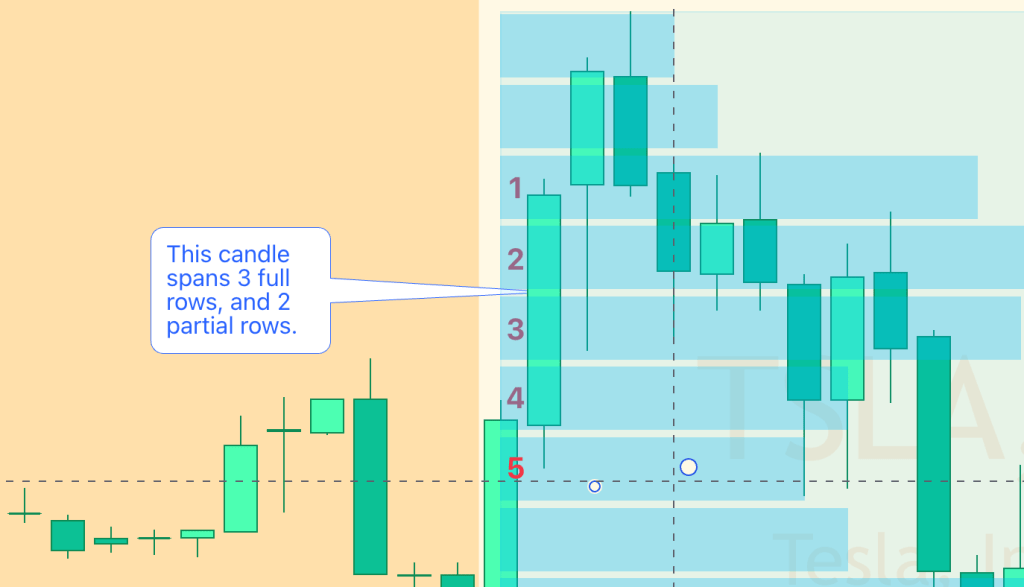
As I was doing research on this library, this was the place where I found that so many other pine coders had tried and failed to find the solution. I’m 99% sure that my solution is exactly what the folks at TradingView did, because if I configure my volume profile library and TradingViews SVP indicator with the same values, not only do my POC and VAH/VAL line up, but the amount of volume that is allocated to each level of my profile matches their amounts perfectly.
For every candle that we encounter in the session, we want to loop through every price level to determine if the candle intersected that level’s range. If it did, we need to know what percentage of the candle intersected so we can assign that percentage of the candle’s volume to the level. So, it goes like this:
// @function Private function used to calculate the volume used across candles.
getVolumeForRow(rowHigh, rowLow, candleHigh, candleLow, candleVolume) =>
    rowRange = rowHigh - rowLow
    candleRange = candleHigh - candleLow
    pricePortion = 0.

    if candleHigh > rowHigh and candleLow < rowLow
        // The candle engulfed the row, so take the entire row range's portion of volume out of the candle
        pricePortion := rowRange
    else if candleHigh <= rowHigh and candleLow >= rowLow
        // The top of the candle is in-or-equal the row, the bottom of the candle is also in-or-equal the row
        pricePortion := candleRange
    else if candleHigh > rowHigh and candleLow >= rowLow and candleLow
        // The top of the candle is above the row, and the bottom is in-or-equal the row
        pricePortion := rowHigh - candleLow
    else if candleHigh <= rowHigh and candleLow < rowLow
        // The top of the candle is in-or-equal the row, the bottom of the candle is below the row
        pricePortion := candleHigh - rowLow
    else
        // The candle didn't intersect with the row at at all
        pricePortion := 0

    // return the portion of volume from the candle relative to the amount of price intersecting the row
    (pricePortion * candleVolume) / candleRange
And that’s it! Now that we are able to assign the volume to the level ranges, we can just loop through every candle in the session and assign the appropriate amount of it’s volume to each price level’s range.

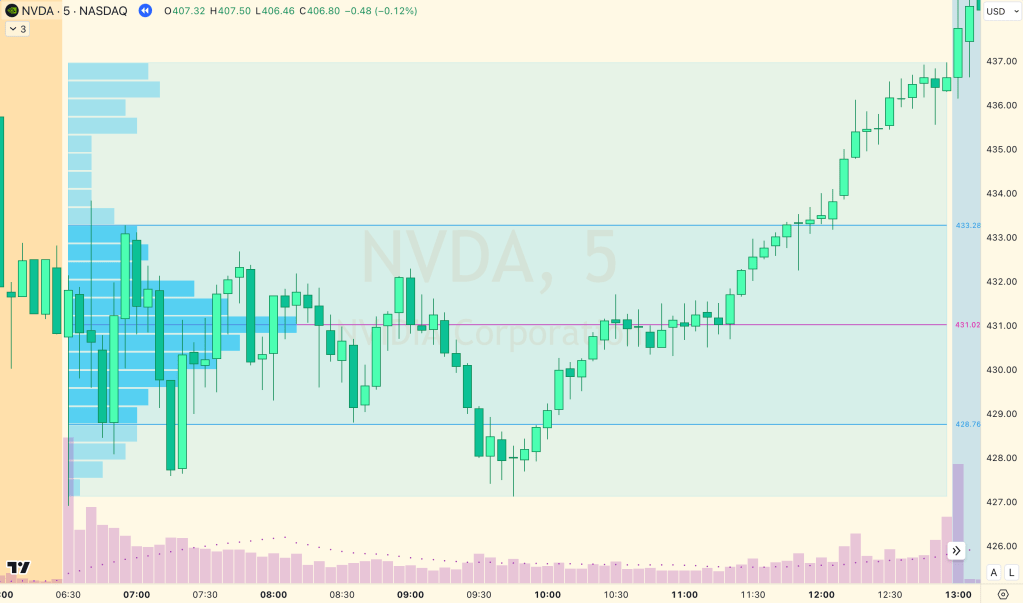
The library comes with a bunch of options. You can even have it show you the developing value area as the day progresses. By default I’ve disabled this because it would mean that all of these calculations are happening on every candle as they form throughout the day. Instead, I’ve set it up with defaults that use as little memory as possible. But I’ve included some handy functions for visualizing the value area. For example, if you want to see the 24 rows across price, we can do that with the histogram,
You can even write the volume in each of the 24 rows. For comparison, here’s a screenshot of my SVP (on the left) and TradingViews SVP (on the right).
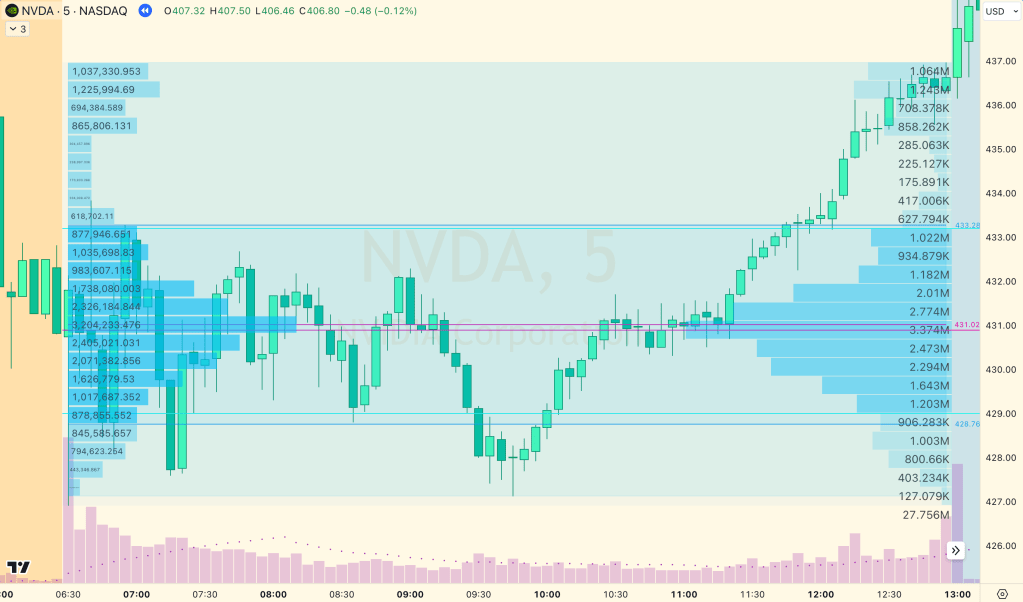
And here you can see my indicator showing the developing value area.

How to use it
If you just add this library on a blank chart, you can see all of the aforementioned configuration options (and more). Now, including this library and rendering volume profile in this way will be an immediate drag on your indicators, so I don’t recommend doing that!
Instead, what I do for my indicators is just grab the information that matters to me. 99% of the time all I want to know is what the POC, VAH & VAL were from the prior day. With that information, I can do whatever I want for my indicator, so I get that info like this:
import jmosullivan/SessionVolumeProfile/2

// Inputs

grp1 = "Volume Profile"
vpNumRows = input.int(group=grp1, defval=24, title="Number of Rows", tooltip="The number of rows to divide the value area into.")
vpValueAreaCoverage = input.int(group=grp1, defval=70, title="Value Area Volume", minval=1, maxval=100, step=1, tooltip="The % of session volume that encompasses the value area.")

// Indicator Logic

// Configure today's SVP
var todaySVP = SessionVolumeProfile.Object.new(vpNumRows, vpValueAreaCoverage)
// Create a null var to hold yesterday's SVP
var SessionVolumeProfile.Object yesterdaySVP = na
// Fetch bars from the lower timeframe for analysis
[ltfHigh, ltfLow, ltfVolume] = request.security_lower_tf(syminfo.tickerid, SessionVolumeProfile.getLowerTimeframe(), [high, low, volume])
// Pass the request variables to the library, along with today's configured SVP object
SessionVolumeProfile.get(todaySVP, ltfHigh, ltfLow, ltfVolume)
// When a new day begins, copy today's volume profile over yesterday's
if session.isfirstbar
    yesterdaySVP := todaySVP.copy()

// Now I have yesterday's SVP information, so I have access to the three values I'm looking for:
// yesterdaySVP.valueAreaHigh
// yesterdaySVP.pointOfControl
// yesterdaySVP.valueAreaLow

// If yesterdaySVP is not null
if not na(yesterdaySVP)
    // ... and current price is above yesterday's point of control
    if close > yesterdaySVP.pointOfControl
        // ... do something!
I hope you do awesome things with this library. Happy coding!
 Improve Your Trading