
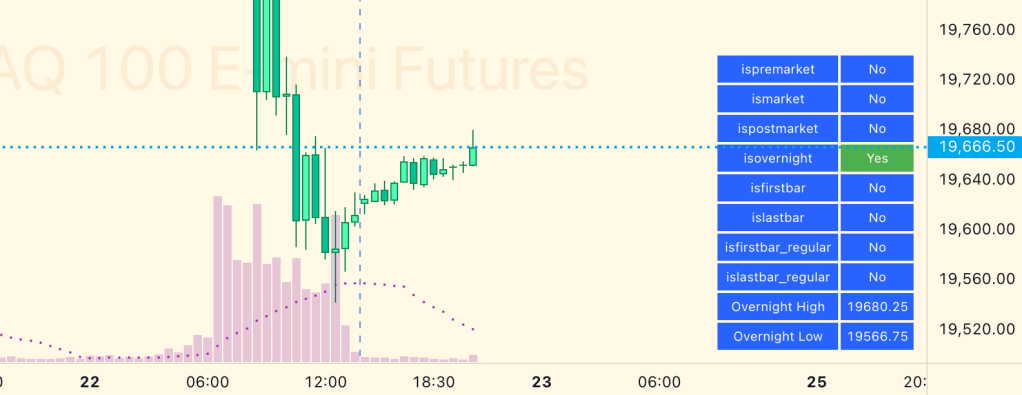
Last year I wrote an open source library for TradingView that enables you to define and use the Session Volume Profile in your indicators. The very first indicator I wrote afterwards was one that I’ve been using privately ever since, called Day Trader Levels. I knew when I wrote it that it would only work for equities, because of a very weird issue that TradingView has related to futures.
You see, on TradingView, if you are looking at a futures chart like NQ or ES and you have Regular Trading Hours selected on your chart, TradingView defines that regular session almost the same as equities except they place the session close 15 minutes after 4pm EST. That’s the first weird thing.
For pine indicator programmers, TradingView provides some handy-dandy properties so you can easily test if a candle is in the regular session or the extended session. Awesome, right? Well, here’s the second weird thing: those properties only work on equities. If you use them on futures, they return “true” when testing to see if the candle is in the regular session, even when you are in the extended session. Uhhhh. Alrighty, then.
So, for the better part of a year I’ve been using this really really nice indicator only for myself because it only worked on equities. I knew if I released it, I would have a ton of futures traders asking me why the regular session doesn’t work and why volume profile is including non-regular trading hours candles, throwing off their volume profile levels.
Well, in recent weeks I’ve started to pay a lot more attention to futures, and these shortcomings in TradingView had been keeping me up at night! I had previously worked on an indicator that had a ton of spaghetti code to work around futures sessions, and I hated the code so much that I didn’t open-source the indicator. I needed a better, simpler way to define custom sessions for futures, and I wanted it to be done in a way that would meet the following criteria:
- Must have elegant, simple, easy to use and understand code. Ideally it would be similar to the existing session properties that TradingView provides
- Since it would be defining session hours, and people might disagree on what the session hours should be, the session ranges must be easily configurable
- Even though the TradingView session properties are incorrect, it must default to those values when it failed to find a custom session definition
With all of this in mind, I created a new open-source library (available for free, right now) called Session. The library follows a similar pattern to TradingView’s session.* properties. It all begins with the definition of a “SessionMap”, which is a map object that contains symbol:session pairs. The session definitions follow the existing hhmm-hhmm:ddddddd string format defined by TradingView. For anyone who got this far, I’ll let you dig into their documentation to understand what that string means. By default, you don’t even have to define a sessionMap variable, and the library will let you call any of the methods without one. If called in this way, it will take care of creating a map for you. But if you want to add custom sessions, or modify existing ones, you would need to create your own session map. I often do this in my own indicators so the methods don’t need to create and recreate maps over and over again when you call them. It’s done like this:
import jmosullivan/Session/2
sessionMap = Session.getSessionMap()
Once you have your session map instance, you can begin to add or edit the definitions to suit your needs. For example, if you wanted to change ES to respect the sessions that TradingView uses (closing 15 minutes after equities regular trading hours close), you would do it like this:
sessionMap.put('ES:market', '0830-1514:123456')
sessionMap.put('ES:overnight', '1515-0829:123456')
So, normally to see if the current candle is in the regular session, you would do it in tradingview like this:
if session.ismarket
     // Do something...
But, as I mentioned above, this wouldn’t work on futures. So, using my Session library, you would do it like this:
if Session.ismarket(sessionMap)
     // Do something...
The library actually provides all of the properties that TradingView does (but as methods instead of properties), they are:
- Session.ismarket() – Returns true if the current bar is a part of the regular trading hours (i.e. market hours), false otherwise. Works for futures (TradingView’s methods do not).
- Session.isfirstbar() – Returns true if the current bar is the first bar of the day’s session, false otherwise. If extended session information is used, only returns true on the first bar of the pre-market bars.
- Session.islastbar() – Returns true if the current bar is the last bar of the day’s session, false otherwise. If extended session information is used, only returns true on the last bar of the post-market bars.
- Session.isfirstbar_regular() – Returns true on the first regular session bar of the day, false otherwise. The result is the same whether extended session information is used or not. Works for futures (TradingView’s methods do not).
- Session.islastbar_regular() – Returns true on the last regular session bar of the day, false otherwise. The result is the same whether extended session information is used or not. Works for futures (TradingView’s methods do not).
- Session.ispremarket() – Returns true if the current bar is a part of the pre-market, false otherwise. On non-intraday charts always returns false. Works for futures (TradingView’s methods do not).
- Session.ispostmarket() – Returns true if the current bar is a part of the post-market, false otherwise. On non-intraday charts always returns false. Works for futures (TradingView’s methods do not).
The Session library also provides some extra functions to give you even more cool stuff, like:
- Session.isovernight() – Returns true if the current bar is a part of the pre-market or post-market, false otherwise. On non-intraday charts always returns false.
- Session.getSessionHigh() – Convenience function to return the session high. Necessary if you want to call this function from within a request.security expression where you can’t return a tuple.
- Session.getSessionLow() – Convenience function to return the session low. Necessary if you want to call this function from within a request.security expression where you can’t return a tuple.
- Session.getSessionHighAndLow() – Returns a tuple containing the high and low print during the specified session.
Under the hood, most of these functions utilize another public method called Session.inSession() that allows you to define which session to check for. This is handy if you end up using the map to define your own custom session names. That way, you could do something like this:
import jmosullivan/Session/2
sessionMap = Session.getSessionMap()
sessionMap.put('ES:my-wacky-session', '0532-1348:123456')
if Session.inSession('my-wacky-session', sessionMap)
     // If the current chart is ES and the current candle
     // is in  my-wacky-session, do something...
Finally, here are the symbols and sessions that are defined by default when the Session Map is created:
| Symbols | Regular Session | Overnight Session |
|---|---|---|
| FESX, FDXM, FDAX, FDXS, FSXE | 0900-1730:123456 | 1730-0900:123456 |
| FGBL | 0900-1715:123456 | 1715-0900:123456 |
| ES, NQ, YM, RTY, MES, MNQ, MRTY | 0830-1459:123456 | 1500-0829:123456 |
| SPX500USD, NAS100USD | 0930-1559:123456 | 1600-0929:123456 |
| CL, MCL, RB, NG, YF | 0900-1430:123456 | 1430-0900:123456 |
| GC, MGC, SI, PL, HG | 0820-1330:123456 | 1330-0820:123456 |
| ZN, ZB, TN, UB | 0720-1400:123456 | 1400-0720:123456 |
| 6B, 6C, 6E, 6J | 0720-1400:123456 | 1400-0720:123456 |
| 6A | 0700-1400:123456 | 1400-0700:123456 |
| ZC, ZW, ZS, ZL, ZM | 0830-1320:123456 | 1320-0830:123456 |
| LE, HE | 0830-1300:123456 | 1300-0830:123456 |
Check out the library on TradingView.
And you can also get the free Day Trader Levels indicator that inspired this library now.
 Improve Your Trading