
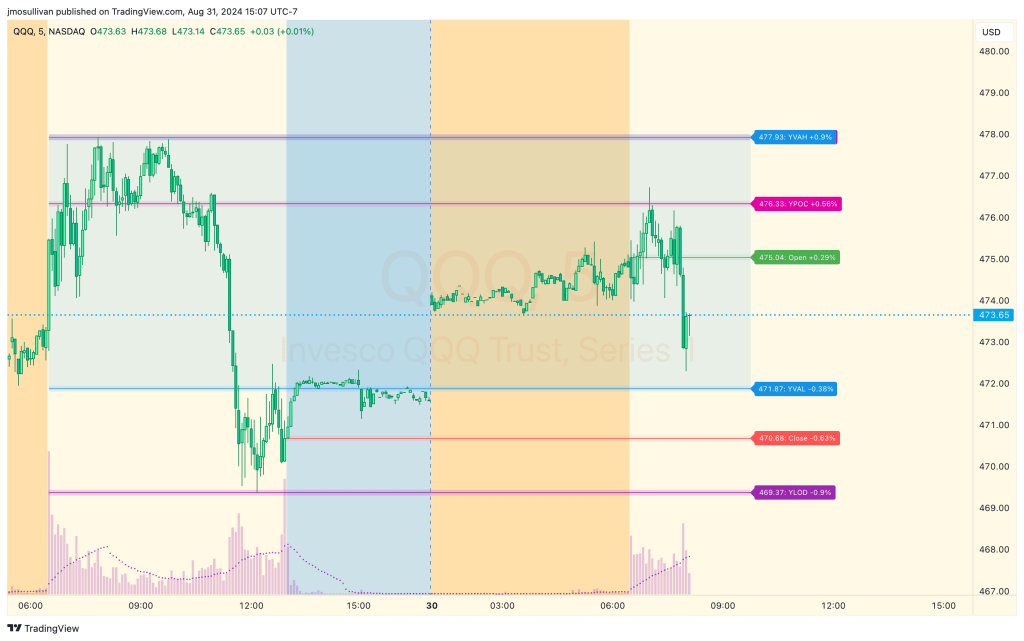
As an intraday trader, there are certain key levels that I care about for short-term price action on every single chart. When I first began day trading, each morning I would painstakingly mark those key levels off on the charts I planned to trade each day. Depending on the number of charts I was watching, this would take up quite a bit of my time that I felt would have been much better spent doing other things. It also meant that those levels would often be left behind, and on later days I might be trading a symbol and get confused when a line appeared and I’d be paying attention to it only to later discover that it wasn’t from prior day, but from some other day in the past when I had marked it off.
I looked all over TradingView to find indicators that did this automatically for me, and I found a lot of them. One by one I tried them, and inevitably I would always find that something was wrong with them. Often they didn’t have all of the levels I wanted (so I would have to combine multiple indicators), but more often I found that the levels would be incorrect, or they would be buggy and not appear consistently, or they would not appear at the right time, or they would not work on futures! The list of problems went on and on. And the biggest issue I found was that nobody knew how to get session volume profile in an indicator.
So, over the course of a few years I figured out how to solve all of those problems and now I’m thrilled to present this free indicator for everyone like me who trades intraday and wants a clean consistent way to see the prior day levels that they care about automatically on every single chart (even futures). The levels the indicator provides are:
- Yesterday High & Low
- Value Area High & Low & Point of Control
- Today’s Open
- Yesterday’s Close (aka “Settlement” on futures)
- Premarket High & Low (non-futures only)
- Overnight High & Low (futures only)
These levels are extremely important, and I expect price to be reactive to them, so each level has a shaded background behind it so that the levels stand out against other lines you may have on your chart.
I try to keep configuration as simple as possible, but there are configuration options that allow you to:
- Hide any of the levels
- Change the color for the levels
- Shade the value area (or not)
- Change the label size, type (basic label or plain text) and location (how far to the right of last candle to place the label
- Session volume profile value area volume & number of rows
The biggest advantage to this indicator over others on TradingView is how it handles session volume profile. When it comes to futures, TradingView does differentiate between regular trading hours and “electronic” trading hours on the charts, but their timeframes for those sessions are unusual, and they do not provide any programmatic way to differentiate between them. So, I created a whole new library for dealing with futures sessions (documented here) that is fully integrated into both my Session Volume Profile library and this indicator, allowing me to bring you the best and only custom indicator available on TradingView that provides you with true regular session volume profile information across every type of symbol, including futures.
I mentioned that one of the biggest problems with other indicators was that the lines didn’t appear consistently or at the right time. This indicator will show you the lines from prior day until the last bar of the regular session, then they will switch over to the current day. If you are trading right until the last bar, this may seem unusual, but there is a really good reason I do it this way. Many traders trade with their charts configured to only show the regular session. So, they trade all day with the levels showing prior day. When they stop trading for the day, they leave their desk, go about the rest of their day, go to sleep, wake up the next morning and come back to the charts. Now they are in new day, and the last bar on their charts are still from yesterday. If I hadn’t switched the levels over when the last bar printed, their charts would be showing the levels from 2 days prior. As they are going about their morning planning, this would make the indicator useless to them. So, rather than waiting until the first bar of the new day to show the levels from prior day, I move them over on the last bar of current day. On charts where extended hours are turned on, it functions the same, except the levels will move over on the last bar of the extended session’s after hours and will feel much more normal.
Speaking of users who only look at the regular session on their charts, even though those traders don’t want to see those candles on their charts, they do want to see the levels. This indicator will show you the overnight or premarket levels even if your chart is configured to not show those candles (no other indicator does this).
I’m incredibly proud of everything I’ve been able to provide with this indicator, and even more thrilled to say that I’m proud of how the indicator has been implemented. Once again releasing this indicator and all associated code for free and open source. I encourage you to take a look at the source code to see how it all works, take advantage of the free underlying libraries I created to make all of this possible: Session Library and Session Volume Profile Library.
You can get the Day Trader Levels indicator for free right now over at TradingView.com.
 Improve Your Trading